Android Notification Blocker by Keyword & Schedule Skip the sale. Keep the delivery update.
You want your parcel update. You don’t need another flash sale. Create a notification rule for the app and words you choose.
Android 7.0+ · Free with ads · No account
How it works
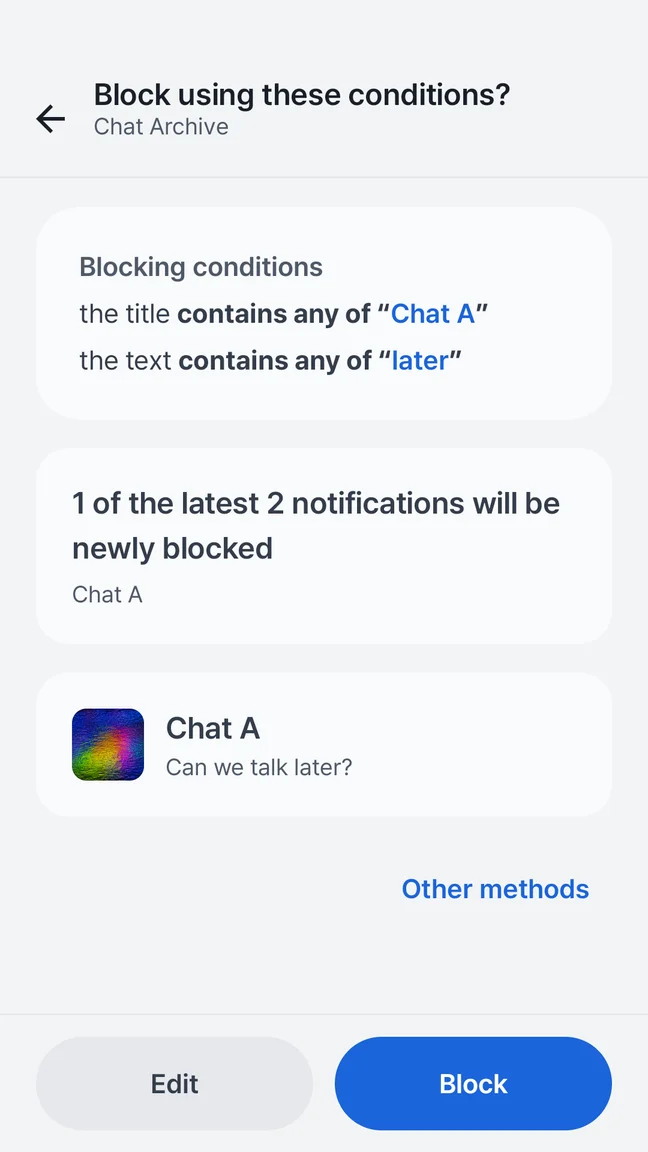
Quietly is an Android notification blocker with rules for the sending app, title, text, days and times. Matching notifications are removed after Android posts them. A specific “flash sale” text rule leaves unrelated wording outside that rule.
Small rules. A noticeable difference.
Start from an unwanted notification, review the proposed conditions, and save a rule you understand. The free app includes up to five saved rules, including schedules.
- Choose the sending app
- Match a phrase in the title or notification text
- Add days and times when you need a schedule
Keep your rule specific.
For a shopping app, “flash sale” is more selective than “today.” A delivery update such as “Your order arrives today” would match “today” but stays outside a “flash sale” rule. Rules match the words you choose; they don’t judge which alerts matter to you.
Make space for focus time.
Add a day-and-time condition when a rule should apply only during part of your week. Review the app’s rule summary before saving, particularly for schedules that cross midnight. Android’s Do Not Disturb controls may be a better first choice for silencing interruptions generally.
Check what the rule actually does.
Blocking happens after Android posts the notification, so a sound or banner may occur first. Some system or ongoing notifications cannot be removed. Block rules take priority over the “Important notifications only” mode; an important pattern does not rescue an alert that also matches a block rule.
A little more clarity.
Can I stop promotions without turning off the entire app?
Will Quietly prevent every notification sound?
Do keyword rules or schedules require Pro?
Explore other Quietly features
Your phone. Your pace.
Preview the message. Filter the noise. Make a little room for yourself.
GET IT ONGoogle PlayAndroid 7.0+ · Free with ads · Optional one-time Pro
 A little quieter starts here.Scan with your Android phone.